
Intro
Game UI (User Interface) includes all the interactive elements players engage with while gaming, such as menus, buttons, and HUD elements. While designing an intuitive and visually appealing UI is essential, proper, high quality game UI localization is also indispensable to ensure the game is accessible, engaging and functional.
Why Game Localization is Essential for UI
The primary goal of game localization is to make the game experience seamless and immersive for players across different languages and cultures. This is particularly important for the UI, which serves as the player’s gateway to the game. Another important aspect of UI localization is that it can prevent the interface from becoming messy and chaotic.
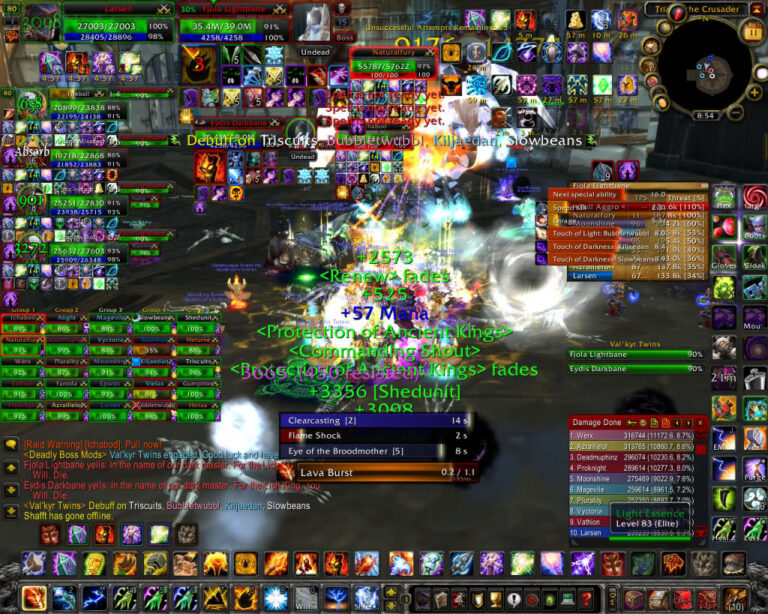
Here’s Why Game UI Localization is so Important
Improved Accessibility and Improved User Experience
At the most basic level, we have accessibility. Game localization ensures that UI elements are understandable and usable by players in various linguistic regions. By localizing the UI, developers can make the game accessible to a wider audience, breaking down language barriers that might otherwise alienate non-native speakers. If you are looking to localize in layers for budgeting reasons, the UI would be one of the top priorities, as it would make the game at least accessible to players. Game UI localization, when done correctly can also significantly boost player engagement. When players can easily navigate the game in their native language, they are more likely to remain engaged and satisfied, leading to longer play sessions and higher retention rates. Game UI localization can prevent players from becoming frustrated, why? Well, have you ever tried navigating a menu you don’t understand trying to desperately find the settings?
Tips For Game UI Localization
Plan for Local Formats Early
Every region has its specific ways of displaying dates, times, currencies, and other numerical data. For instance, the date “04/12/2024” might mean April 12th in the U.S. but December 4th in Europe. It’s essential to design your UI to accommodate these variations from the get-go. Not only does this improve user experience, but it also reduces the chances of costly redesigns later in the development process, which trust us, you would really want to avoid.
Support Multiple Languages and Scripts
While English is written left-to-right, languages like Arabic and Hebrew are written right-to-left. You should be prepared to handle these differences. This might involve mirroring the entire layout of your game’s UI or providing ample space for text expansion, as some languages take up more space than others when translated. For instance, German words tend to be longer than their English counterparts.
Incorporate Universal Icons and Symbols
Icons are a powerful way to communicate without words, but they must be chosen carefully. Some symbols might be easily understood in one culture but confusing or not that common in another. Where possible, use universally recognized symbols. If your game includes culturally specific icons, consider creating localized versions for different markets.
Leave Room for Text Expansion
A common pitfall in game localization is underestimating the space needed for translated text. Since translations can expand text in some cases, it’s crucial to design UI elements like buttons, menus, and dialogue boxes with extra room. This approach avoids awkward text breaks or the need for abbreviations that might confuse players.
Use Scalable UI Elements
Dynamic UI elements that can adjust in size to accommodate different text lengths and formats are invaluable. This scalability ensures that your UI remains clean and functional across all languages without the need for separate layouts for each locale. Elements such as buttons, text boxes, and menus should be designed to grow or shrink based on the content they need to display.
Keep Text Out of Images
One of the most expensive UI localization mistakes is baking text directly into textures and images — a stylized “Play” button drawn as a graphic, a map with location names painted on, a tutorial screenshot with embedded captions. Every one of those assets has to be recreated by an artist for every single language, instead of simply being retranslated. Wherever possible, keep text as actual text rendered on top of the artwork, and store all UI strings in external files rather than hard-coding them into the game’s source. Externalized strings can be handed to translators, updated, and swapped per language without touching the build — which makes the whole localization process faster, cheaper, and far less error-prone.
Choose Fonts That Cover All Your Languages
A font that looks perfect in English may be missing the accented characters other European languages need, and will almost certainly not include Cyrillic, Arabic, or the characters required for Chinese, Japanese, and Korean. Check character coverage for every target language before you commit to a typeface, and set up fallback fonts for anything your main font can’t display — the alternative is empty boxes where letters should be. Also consider readability: some scripts need a larger minimum size or more generous line spacing than English to stay legible on screen, especially on small UI elements like tooltips and HUD labels.
What Is Pseudolocalization?
Pseudolocalization is a testing technique that catches UI problems before any real translation happens. The idea is simple: run your English strings through an automatic transformation that makes them longer, adds accented characters, and wraps them in markers — then play the game. Text that gets cut off reveals UI elements too small for translated text. Missing accents reveal font problems. Strings that still appear in plain English reveal text that was hard-coded and never extracted for translation. It’s a cheap early-warning system that finds structural issues while they’re still easy to fix.
Test, Test, Test
Localization testing is vital to catching issues that might not be apparent during the initial design phase. The translation phase may have caused some bugs or issues, so it is important to test that everything fits, it’s properly translated and runs smoothly.
This stage is usually called localization QA (or LQA), and it means playing the game in each target language with a checklist in hand. Here’s what testers typically look for:
- Truncated or overlapping text — labels cut off mid-word, strings spilling over buttons or colliding with icons.
- Untranslated strings — bits of English still showing in menus, tooltips, or error messages.
- Broken variables and placeholders — code fragments appearing on screen instead of a player name or item count, or sentences that no longer make grammatical sense once the variable is filled in.
- Wrong line breaks and hyphenation — especially in languages with long compound words or scripts with different word-wrapping rules.
- Layout issues in right-to-left languages — mirrored elements that shouldn’t be mirrored, or text aligned the wrong way.
The important part is testing in context, on real hardware where possible. A string that looks fine in a spreadsheet can still break the moment it’s rendered inside an actual button on an actual screen.
Conclusion
So, whether you are on a budget or have plenty of resources, you now know the importance of game UI localization, and with these tips you will not only have a clean and crisp UI, but you will also be able to approach localization much more easily, for a smooth and stress free experience. Remember, through the UI, players interact with your game and enjoy it fully. It represents one of the fundamental aspects of your game, as it is one the first things gamers interact with when playing your game, and you know what they say about first impressions.
So, if you are ready to make a good first impression on players, reach out to us for a spotless game UI localization!